
Customer Support or Outsourcing
How to Outsource Customer Support: A Practical Checklist
How to Outsource Customer Support: A Practical Checklist
Learning how to outsource customer support starts with deciding what your customers need and which responsibilities a provider can manage. Before comparing prices, define your support channels, coverage hours, common enquiries and escalation rules.
Customer support outsourcing means assigning agreed customer service tasks to an external team. Your business still controls its policies, customer promises and approval decisions. Meanwhile, the provider handles the work within those boundaries.
This checklist explains how to prepare, evaluate providers and introduce outsourced support without losing oversight.
1. Define the Customer Support You Need
Start by reviewing the enquiries your business receives. Which issues occur most often? When do customers contact you? Which requests require the most time?
Use this information to create a clear scope. For example, you might need help with:
- Answering product and service questions.
- Providing order or delivery updates.
- Managing email enquiries and live chat.
- Handling inbound customer calls.
- Troubleshooting common account issues.
- Escalating complaints and technical problems.
Next, separate routine requests from decisions that need internal approval. Refund exceptions, sensitive account changes and serious complaints may require your own team’s involvement.
A clear scope helps providers propose suitable staffing and prevents misunderstandings later.
2. Choose Your Channels and Coverage Hours
You do not need to outsource every support channel at once. Instead, begin with the area where additional help would make the greatest difference.
For instance, a business with an email backlog might start with inbox support. Another business might need live chat during busy periods or calls answered outside its existing working hours.
Document:
- The channels the provider will manage.
- The time zones and hours requiring coverage.
- The languages your customers need.
- Expected enquiry volumes and seasonal peaks.
- Arrangements for weekends, holidays and absences.
If you need continuous coverage, ask how shifts, handovers and backup staffing will work. A promise of availability should be supported by a practical staffing plan.
3. Prepare Your Knowledge Base and Escalation Rules
An external team needs accurate information before it can represent your business effectively.
Prepare a working knowledge base containing product details, policies, common questions and approved troubleshooting steps. Include example responses, but allow agents to adapt their wording to the customer’s situation.
Your escalation guide should also explain:
- Which issues agents can resolve independently.
- Which actions require approval.
- Who receives each type of escalation.
- What information must accompany the request.
- What agents should tell customers while awaiting a decision.
For example, an agent might explain your standard refund policy but need approval before offering an exception.
Finally, assign someone within your business to maintain these documents. Outdated instructions can cause inconsistent answers even when agents follow the process correctly.
Your support instructions should be easy to find and update. For practical guidance on organising this information, see Zendesk’s guide to creating a knowledge base.
4. Evaluate Providers Beyond Their Sales Presentation
When comparing providers, ask how their team would handle your actual support requirements.
Useful questions include:
- How do you recruit and assess support agents?
- Who trains the team on our products and policies?
- How do you review conversations and provide coaching?
- Who manages the account and handles urgent concerns?
- What happens when an agent is absent or leaves?
- Which reports will we receive?
- How do you control access to customer information?
Where appropriate, use a practical exercise with fictional customer enquiries. This can help you assess written communication, problem-solving and escalation judgement.
Look for clear explanations and realistic commitments. Claims about speed or quality are more useful when the provider explains how they will measure and deliver them.
5. Compare the Full Cost of Outsourced Support
Providers may charge by agent, hour, enquiry or an agreed monthly package. Therefore, compare what each proposal includes before judging the headline price.
Check whether the quotation covers:
- Recruitment and initial training.
- Team supervision and quality reviews.
- Helpdesk or communication tools.
- Weekend and holiday coverage.
- Additional hours or unexpected enquiry volumes.
- Reporting and account management.
- Setup fees and minimum commitments.
Also, clarify how staffing changes affect the price. A low starting rate may become less attractive if essential responsibilities carry separate charges.
Your comparison should consider the support you receive, the time your internal team still needs to contribute and the provider’s ability to meet the agreed scope.
6. Agree on Quality Measures Before Launch
Define what good customer support means for your business.
Response speed matters, but it should be assessed alongside accuracy, resolution quality and customer experience. Otherwise, agents may feel pressured to close conversations before an issue is properly addressed.
Depending on your channels, useful measures include:
- First response time.
- Resolution time.
- Customer satisfaction feedback.
- Conversation quality scores.
- Unresolved enquiry backlog.
- Correct use of escalation procedures.
Specify how each measure will be calculated. For example, distinguish working-hour response times from elapsed time and automated acknowledgements from human replies.
Then agree on reporting frequency and who will review the results.
7. Start With a Controlled Pilot
A pilot lets you test the working relationship before expanding the scope.
Begin with a defined channel, enquiry category or coverage period. During this stage, review sample conversations and collect feedback from both the provider and your internal team.
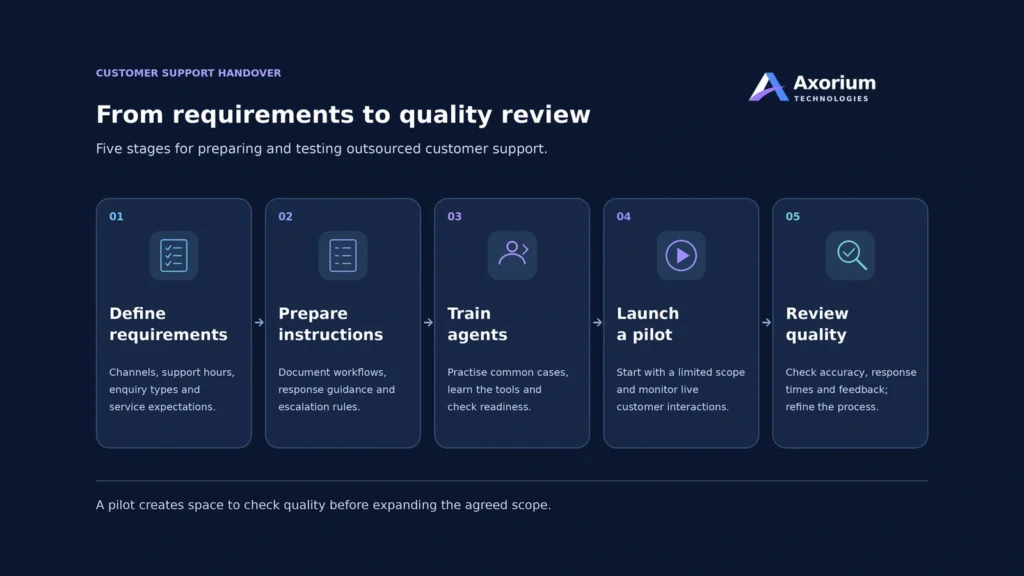
A useful launch sequence is:
- Introduce your products, policies and support tools.
- Practise with sample enquiries.
- Handle live requests under supervision.
- Review mistakes and update instructions.
- Expand responsibilities when agreed standards are met.
Set clear conditions for completing the pilot. These might include accurate answers, appropriate escalations and consistent coverage.
The length of the pilot should reflect the complexity of your support work.
8. Keep Clear Ownership After the Handover
Outsourcing customer support still requires active management.
Assign an internal owner who can answer questions, approve exceptions and communicate policy changes. Similarly, the provider should identify a person responsible for delivery and performance.
Use regular reviews to discuss recurring complaints, knowledge gaps and workload changes. Customer enquiries can also reveal problems elsewhere in the business, such as unclear product information or repeated delivery issues.
Before expanding the engagement, review whether the existing arrangement is meeting your customers’ needs.
How to Outsource Customer Support: Your Checklist
Before you begin, confirm that you have:
- Defined the tasks and channels being outsourced.
- Agreed on coverage hours and staffing arrangements.
- Prepared current policies and support instructions.
- Set approval boundaries and escalation contacts.
- Reviewed pricing, exclusions and contract terms.
- Agreed on quality measures and reporting.
- Planned a supervised pilot.
- Assigned an internal point of contact.
Frequently Asked Questions
How do you outsource customer support?
Define your support requirements, prepare your policies and evaluate suitable providers. Next, agree on responsibilities, pricing and quality measures. Train the external team and begin with a controlled pilot before expanding the work.
Can a small business outsource customer support?
Yes. A small business can outsource a limited scope, such as email enquiries or support during specific hours. The arrangement should match its enquiry volume, budget and ability to train and oversee the provider.
Should you outsource all customer support channels together?
You can begin with one channel and add others later. Starting with a narrower scope makes it easier to test communication, training and quality before introducing more responsibilities.
Who handles complaints and refund approvals?
This depends on the agreed scope. Agents can handle routine complaints and policy-based requests, while exceptions or sensitive decisions can remain with your internal team. Document these boundaries before launch.
How can you maintain quality with an outsourced team?
Provide accurate instructions, review sample conversations and give regular feedback. Clear escalation rules, measurable standards and an accountable contact on each side help maintain consistency.
Discuss Your Customer Support Requirements
Axorium Technologies offers customer support outsourcing for businesses seeking help with customer enquiries and daily service operations.
Explore our customer support services or contact us to discuss your channels, coverage requirements and the work you need help managing.